Or: how I spent weeks training a model to do what a single image crop already does
Look. I saw Midjourney's blend feature and thought: I can do that. I can definitely do that. How hard can it be? You take two pictures, you mush them together, you get a third picture that has the vibe of both. Simple.
Turns out, "mush them together" is doing a lot of heavy lifting here. Midjourney's blend is this black box magic act where two images walk in and one beautifully composed hybrid walks out. The style, the content, the lighting, the objects. All thrown into a blender and served as a perfectly smoothie.
I wanted that. What I got was, well, it's complicated. I tried to cheat my way to compositional image blending, and the result is best described as "it does something, at least."
The Dream
Back when I was playing with StyleGAN interpolations, there was this beautiful thing that happened when you walked between two latent codes. The nose would morph from person A into person B. The background would smear from a cat to a castle. Everything blended continuously, and it felt like magic because you could see the model was making decisions about what to keep and what to discard.
Midjourney's blend feature gave me the same feeling. You give it a photo of a stone cottage and a photo of a cyberpunk city, and it produces a stone cottage that somehow has neon signs and rain-slicked streets. The composition is fresh. The model did more than average the two inputs together.
My pitch was: I want a model that takes elements from each image and places them together in a new composition. Not just a 50/50 soup where everything averages out. An actual compositional blend, where object A from image 1 appears alongside object B from image 2 in a brand new scene.
That was the dream. Spoiler: the model did not share my vision.
The Janky Approach
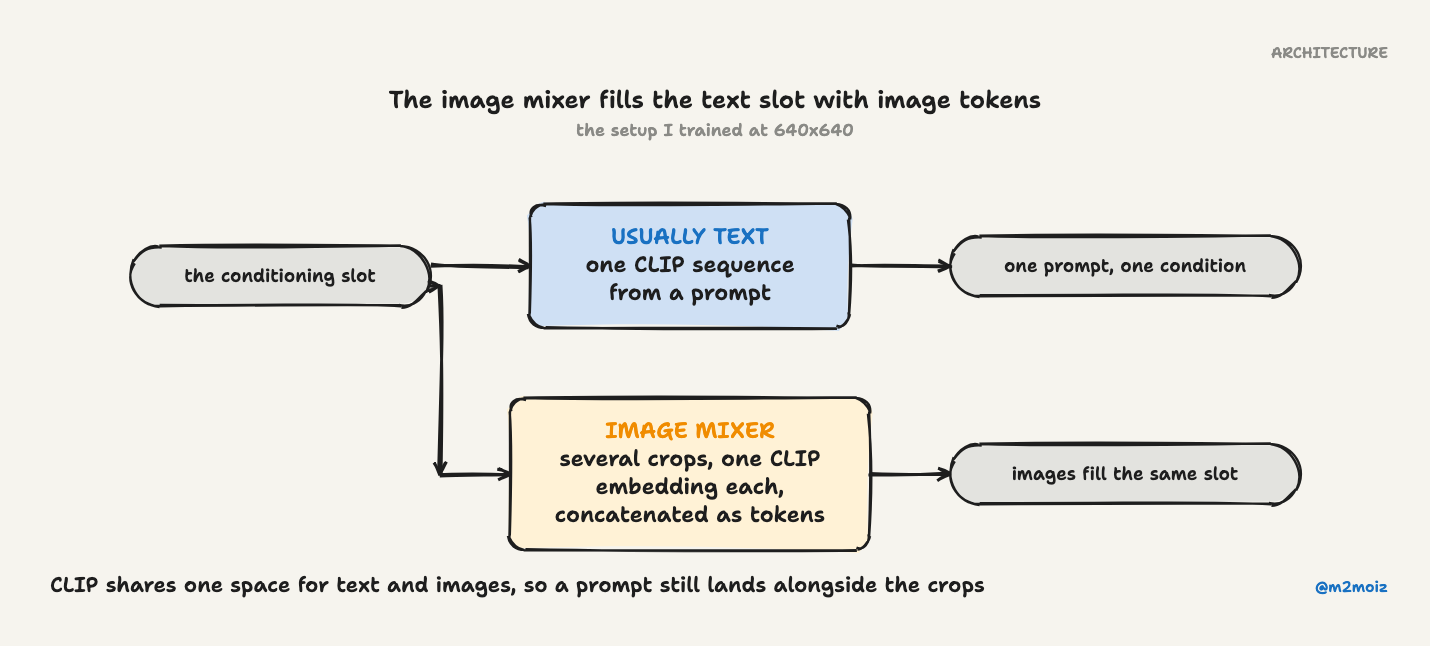
I started from an Image Variations model, one of those diffusion models where you feed in a picture and it generates variations of that picture in the same style or content space. The standard approach is to take the CLIP embedding of the whole image and use it as the conditioning signal for the diffusion process.
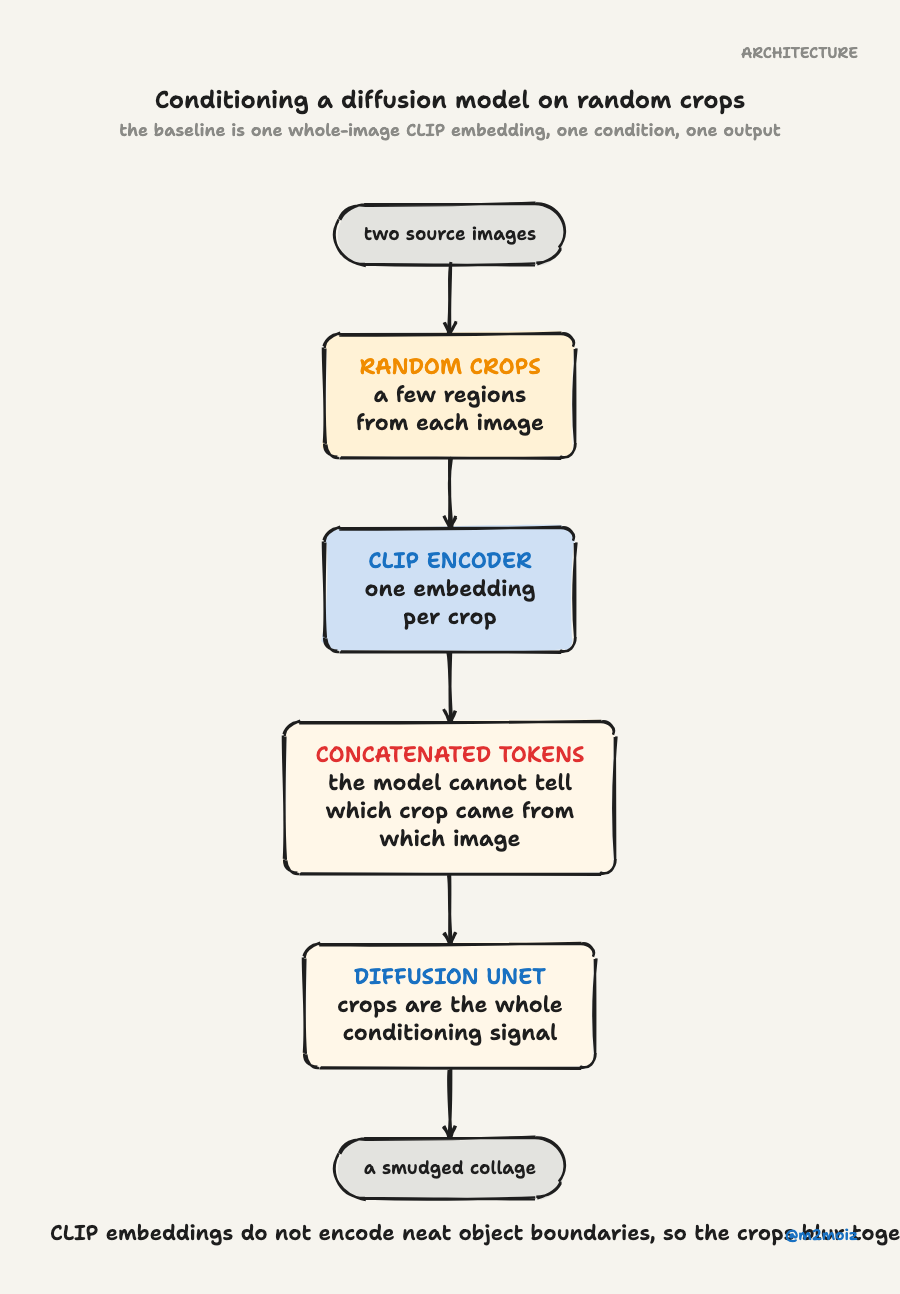
One embedding, one image, one output. Clean.
My idea was: what if instead of one CLIP embedding from the whole image, I took a bunch of random crops from the image and fed all of their CLIP embeddings as conditions? I'd concatenate them into a longer sequence of tokens and let the diffusion model figure out what to do with this visual buffet.
The theory: the model would learn that the different crops represent different elements of the scene. It would then compose those elements together into a reasonable image. The crops from one image give it objects and textures; the crops from the other image give it more objects and textures; the model stitches them into something coherent.
A smarter person would have stopped here and realized: "wait, the model has no way to know which crop came from which image, and CLIP embeddings don't really encode neat object boundaries." I am not that person, so I forged ahead.
Training at 640x640 Because Reasons
The Image Variations model was trained at a certain resolution, and I needed to bump it up. Why? Because if you're going to take crops from an image and still have those crops contain meaningful content rather than just a blur of pixels, you need room to maneuver. 640x640 gave me enough space to extract decent-sized crops that still represented recognizable parts of the original.
I fine-tuned the model at this higher resolution, feeding it crop sequences during training. Every training iteration, I'd randomly crop a few regions from the input image, encode them through CLIP, and feed that concatenated mess into the diffusion pipeline.
The model trained. It took a while. I watched loss curves go down. I felt good about myself.
Did It Work?
Kind of. Ish. Sometimes.
If you squint, the model does manage to mash different concepts together. You can feed it a picture of a castle and a picture of a forest, and it'll produce a castle surrounded by trees that look like they came from the forest picture. Not perfectly composed, and the image quality has a certain "I definitely generated this with a fine-tuned model that doesn't quite know what it's doing" vibe. The concepts tend to blend together rather than stay compositionally separate.
What I wanted was clean compositional separation: object from one image, background from another, arranged in a new scene. What I got was more like a collage that someone smudged with their thumb while the paint was still wet.
But sometimes the smudging looks cool.
The Accidental Cool Feature
One nice side effect: you can also add text prompts. Because the model was trained in CLIP's shared image-text latent space, the text conditioning still works alongside the image crops. So you can say "make it sunset" on top of blending two images, and it'll mostly listen.
This is the kind of feature you discover by accident and then pretend you planned all along.
The Approach That Didn't Work (But Taught Me Something)
I also tried a variant where the model received one global CLIP embedding of the full image plus a set of smaller crops. My reasoning: the global embedding would handle the broad content and composition, while the local crops would influence texture and style details. A kind of coarse-to-fine control hierarchy.
The model had other plans. It basically ignored the nice hierarchy I designed and did its own thing. No style transfer separation emerged. The global and local signals just blurred together into the same mush. It was humbling.
Should You Use This?
It's a fun toy. By modern image generation standards, it's outdated and janky. But if you want to feed it two pictures and see what comes out the other end, the results are occasionally surprising in a good way. The model does something, and sometimes that something is genuinely interesting.
Would I call it a success? No. I went in wanting compositional image blending and came out with a diffusion-powered smoothie maker. But smoothies are tasty, and I learned that feeding a model multiple crops of an image is not the same as teaching it to understand object-level composition.