I need to come clean about something.
I used to have 47 Conda environments on my machine. Forty seven. Each one roughly the size of a small operating system. I kept them around because I was afraid to delete any of them. What if I needed that obscure Python 3.6 setup I had not touched in two years? What if the paper I published in 2022 suddenly needed reproducing at 3 AM and I did not have the exact dependency matrix?
This is pathological behavior. I know that now.
But in my defense, Conda trained me to think this way. It created a world where each environment was such a production that you never wanted to go through the setup again. So you hoarded them. Like a digital dragon sitting on a mountain of redundant Python installations.
Then two things happened. Anaconda started demanding money from universities. And I finally added up how much disk space I was sacrificing to my environment hoard. Double digits in gigabytes. For what? So I could run conda activate ancient-project-2019 exactly zero times in the past year?
Something had to change.
The Conda Shock
What nobody tells you when you first install Conda: it is not actually free. Well, it was free for a while. Then a March 2024 terms-of-service change put universities and research labs on the same footing as everyone else. Anaconda's pricing page states it plainly: users within organizations with 200 or more employees or contractors require a paid Business license, and Business is fifty bucks per user per month. They also threatened back-billing for unauthorized use. Anaconda has since clarified that accredited universities stay free when the use is course curriculum, which takes some of the sting out. Not enough of it.
If you have ever worked in a university lab, you know that fifty bucks a month per person might as well be a million dollars. The budget for Python environments is approximately zero dollars.
But the pricing thing is almost a side issue. The real problem is that Conda is a bloated monster. Each environment is its own world that builds its own copies of everything. pip integration is janky. The ecosystem lock-in is real. And if you are on a shared compute cluster with a small home directory quota, Conda will eat your lunch.
I was in denial for a long time. I told myself I needed Conda because science. Because astronomy packages are complicated. Because this is just how Python works.
None of that was true. I was just comfortable.
The Lightweight Awakening
Enter pyenv. Which I had heard about for years and dismissed because I assumed it would be complicated to set up. That assumption was wrong. Embarrassingly wrong.
pyenv is a shell tool that manages Python versions. That is it. It does not build its own world or carry gigabytes of overhead. It installs the Python version you want and lets you switch between them with simple commands.
Consider the difference. A Conda environment takes several hundred megabytes to a gigabyte just for the base install. pyenv plus a virtual environment is your code plus the packages you explicitly install with pip. That is it.
I installed it. Set up my first virtual environment. Watched it use maybe 50 megabytes. And I felt genuinely stupid for not doing this years earlier.
How It Actually Works (The Part I Wish I Had Read)
The setup is straightforward. But a few things tripped me up, so I will point them out.
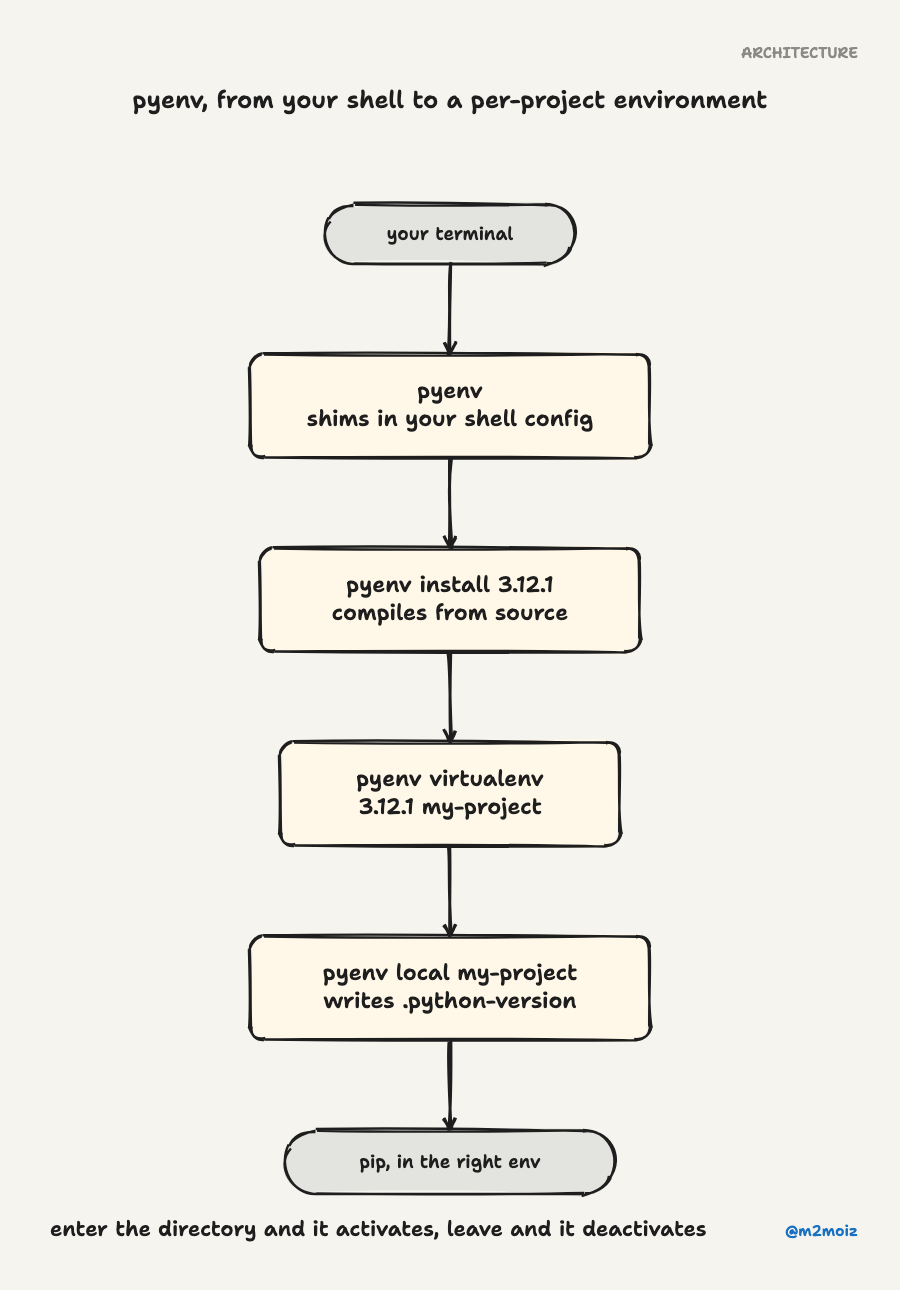
Step one: install pyenv. If you are on Mac or Linux, the automatic installer is one curl command. On Windows, there is a fork called pyenv-win that does the same thing. I am on a Mac, so I ran the installer, added a few lines to my shell config, and reopened my terminal.
Step two: install a Python version. You just run pyenv install 3.12.1 and it downloads and compiles that version. This is the part that surprised me. Compiling Python from source takes a few minutes. It is not instant like Conda downloading a prebuilt binary. But the upside is that it works everywhere, even on machines where you do not have admin access.
Step three: install pyenv-virtualenv. This is a plugin that adds virtual environment management. Without it, pyenv only manages Python versions. With it, you get the equivalent of Conda environments but without the bloat.
Step four: create an environment and pin it to a folder. This is the killer feature. You create a virtual environment with pyenv virtualenv 3.12.1 my-project. Then you run pyenv local my-project inside your project folder. That creates a .python-version file. Every time you enter that directory, pyenv automatically activates the right environment. Every time you leave, it deactivates.
No more manually activating and deactivating environments. No more forgetting which environment you are in and installing the wrong packages. Just a file in your project root that says "use this Python setup."
This one thing changed my workflow more than I expected.
The Evolution (Because We Never Stop Refactoring Our Tools)
Then I found uv. Written in Rust. Ridiculously fast. It can replace pip, virtualenv, and pyenv all at once if you want. I have since migrated most of my projects to uv.
But getting there mattered more than I expected. If I had tried to go straight from Conda to uv, I think I would have been overwhelmed. pyenv was the intermediate step that taught me what I actually needed: Python version management, lightweight virtual environments, and per-project configuration.
Once I understood those concepts, uv felt like a natural upgrade. But I needed the pyenv stepping stone to get there.
What I Wish Someone Had Told Me
Looking back, a few things I wish someone had sat me down and explained:
You do not need Conda for science. I was in astronomy. Half my colleagues used Conda. The other half used whatever they inherited from their advisor. Nobody could articulate why they used it. It was just the default. Once I switched, I realized that pip handled every package I needed. The supposed scientific package advantage of Conda was vastly overstated for my use case.
Environment hoarding is a symptom, not a solution. Keeping 47 environments around is security blanket behavior. If you have a pyproject.toml file (or even a requirements.txt), you can recreate any environment in minutes. Let them go. Delete them. You will feel lighter.
The Python packaging chaos is real, but you do not have to solve it. There are at least seven popular Python packaging tools right now. Pip, Pipenv, Poetry, Hatch, PDM, Rye, and uv. Plus Conda and its forks. Nobody agrees on the right approach. This is frustrating, but it is also not your problem to fix. Pick one that works for you and stop second-guessing.
The Bottom Line
pyenv is not some perfect tool. It is simple and solid, and it solves a real problem without adding new ones. When the Python packaging ecosystem is a dumpster fire, simple and solid counts.
If you are drowning in Conda environments, or if your university just got hit with the Anaconda licensing change, or if you just want to reclaim fifty gigabytes of disk space, give pyenv a try. It takes maybe twenty minutes to set up. The worst that happens is you learn something about how Python version management actually works.
And if you outgrow it later and move to uv or whatever comes next, that is fine too. Finding the perfect tool was never the goal. The point is to stop the stuff that costs you money, eats your disk, and makes you dread environment management. pyenv clears that bar. If something better comes along later, great. But for now, this works.
I cannot get my 47 environments back. But you do not have to make my mistakes.