I was this close to buying one of those AI recording gadgets. You know the ones. They show up in every ad, every tech review, every "best AI tools" listicle. A sleek little puck that follows you around, transcribes your meetings, captures your thoughts. The pitch writes itself: capture everything, never lose a thought.
The price tags all land in the same ballpark too. Somewhere between $150 and $400, plus a monthly subscription if you want the transcripts to actually go anywhere useful.
I had my credit card out, reading reviews, mentally clearing a spot on my desk for yet another charging cable.
Then I looked down at my wrist.
The Gadget I Already Own
The AI recording puck has a microphone, a button to start recording, wireless sync to your computer, and a cloud service that transcribes your audio.
My Apple Watch has a microphone, a button to start recording (the Action Button, which is an Ultra-only piece of hardware, though any watch can put Voice Memos one tap away with a complication), wireless sync to my Mac, and... well, the transcription part needs a little help. But the foundation is already there.
The recording gadget industry is a hardware solution to a software problem. The hardware is already on your wrist. The software is what you add to it.
I almost missed this because I was too busy shopping to notice what I already owned.
The Architecture I Designed Before I Spoke to Anyone
When I first realized the Apple Watch could be a recording device, my brain went straight to the most complicated possible solution. Naturally.
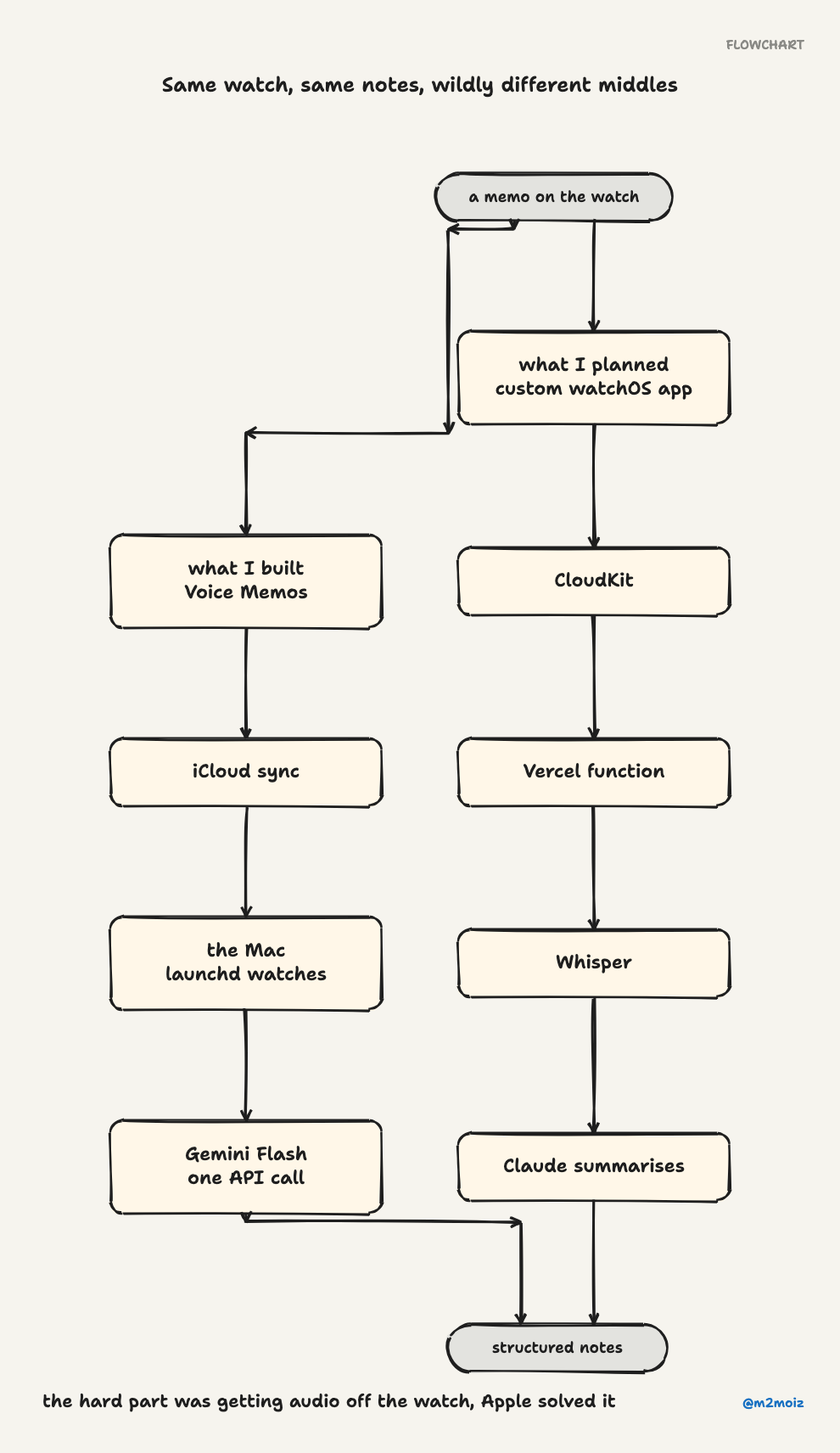
I sketched a custom watchOS app that would record audio, upload it to a Vercel serverless function, run it through Whisper for transcription, feed the text to Claude for summarization, and push structured notes back to my note-taking system. Clean architecture. Beautiful diagram. Completely unnecessary.
I am very good at overengineering things before I understand the problem.
The Friend Who Saved Me From Myself
Before writing any code, I talked to someone who had actually built a custom watchOS recording app. His experience was a horror story told in three acts:
Act One: watchOS networking is a liar. Battery management aggressively kills background connections. Your audio upload might complete. It might not. It won't tell you either way.
Act Two: CloudKit as middleware is a mess. The pipeline becomes watch records, CloudKit syncs, server polls CloudKit, server processes. That is four separate potential failure points for what should be a simple operation.
Act Three: the 30-second chunking problem. watchOS limits background audio recordings to 30-second chunks. A five-minute meeting generates ten small files. CloudKit does not handle bulk small-file sync gracefully. Your transcript comes out in fragments.
His conclusion, after weeks of development and debugging: "The watch records fine. Automated workflow for getting the audio off the watch? Haven't found a good approach."
That sentence saved me weeks of my life. It contained nothing new; it reframed the entire problem. Recording is easy and transcription is straightforward. Getting audio off the watch reliably is the hard part. And Apple had already solved it.
The Discovery That Made Me Feel Very Foolish
Voice Memos syncs via iCloud. Not through the developer API. It goes through Apple's own sync infrastructure, the same engine that handles Photos, Notes, and every first-party app. It has been running reliably for years. It handles large files and works in the background. It is invisible and boring, which is exactly what you want from infrastructure.
I tested it. I pressed the Action Button, recorded a 30-second memo, stopped it. Opened Finder on my Mac.
The file was already there. In ~/Library/Group Containers/group.com.apple.VoiceMemos.shared/Recordings/. It appeared within seconds.
That was the moment my elaborate architecture diagram became wallpaper. No watchOS app needed. No CloudKit. No server. Just a file watcher on my Mac.
The best code is the code you do not write. Every line of that custom watchOS app I did not build is a line that will never break, silently drain the battery, or fail during a network handoff. Voice Memos sync costs nothing to run and nothing to maintain. It is built into the operating system. It just works.
What I Actually Built (It Is Embarrassingly Simple)
With the hard problem already solved, the remaining work took about thirty minutes.
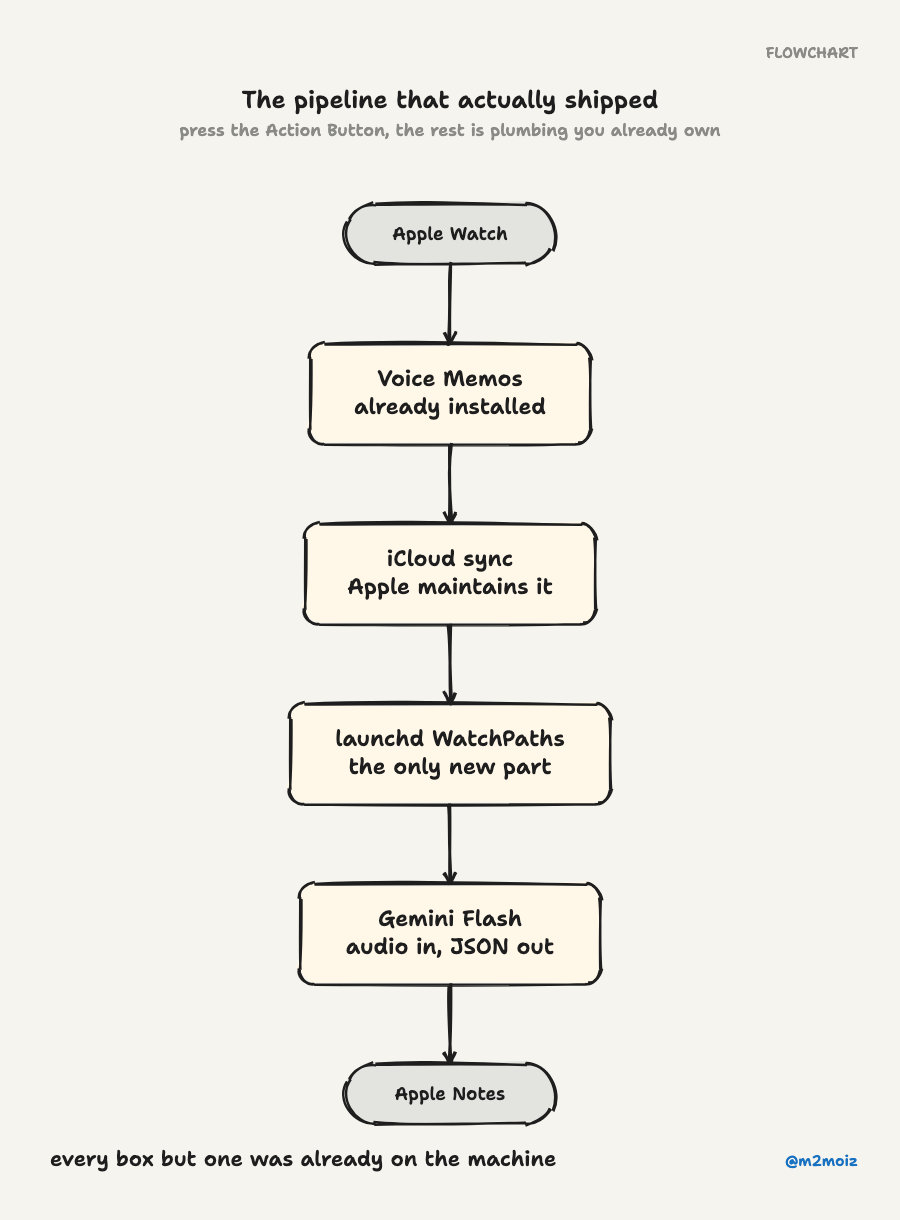
File watching. macOS has a built-in tool called launchd that has been around since 2005. It has a WatchPaths directive that watches a directory and triggers a script when a new file appears. No polling. No cron job. No third-party library. The operating system does it natively.
Transcription and analysis in one call. This is the part that feels like magic. Most pipelines do two separate steps: speech-to-text with one service, then text analysis with an LLM. That means two API calls, an intermediate text file, and all the audio nuance (tone, emphasis, pauses) gets lost when you serialize the speech into text.
Gemini Flash accepts audio directly. You send the .m4a file. You get back structured JSON with the transcription, key points, action items, and even a summary. The model hears the audio and reasons about it at the same time. One call. Done. Nothing gets flattened into text and lost along the way.
Delivery targets. The script is designed with a pluggable system. Each target is a simple Python function that takes the structured JSON and writes it somewhere: Apple Notes, Obsidian, a local file, whatever. Adding a new target takes minutes.
The most interesting target shells out to Claude with a prompt containing the transcription. This means any Claude Code skill becomes a delivery target without writing integration code. Want to post a summary to Slack? You drop a sentence describing it and Claude handles the rest. Creating tickets or drafting follow-up emails follows the same pattern. The AI becomes the glue layer. Instead of writing API clients for each destination, you describe the destination in natural language.
The full workflow is almost boring in its simplicity:
- Press Action Button on the watch
- Record a voice memo
- Stop recording
- File syncs to the Mac via iCloud (takes seconds)
launchdspots the new file and triggers the script- Gemini Flash transcribes and analyzes everything in one call
- Structured notes land wherever you want them
There's no app to install on the watch, no server to maintain, and no subscription or extra charging cable.
What I Learned (Besides That I Overengineer Things)
This whole thing took maybe two hours from start to finish. But the thinking behind it applies to a lot more than voice transcription.
Talk to people who have built what you want to build. My friend's experience with watchOS saved me weeks. I would have hit every single failure mode myself because nothing in the documentation warns you that battery management will silently kill your network calls. The internet tells you to build a watchOS app. Someone who actually tried tells you not to. A ten-minute conversation is worth more than a week of prototyping.
Use the platform primitives. Voice Memos, iCloud sync, and launchd WatchPaths are boring infrastructure. They do not show up in architecture diagrams. They do not have version numbers to track. They just work. The most reliable system is the one that delegates hard problems to layers that have been solving them for decades.
Multimodal APIs collapse pipelines. Shifting from "transcribe then analyze" to "send audio, get analysis" eliminates an entire class of bugs: encoding issues, lost context, format mismatches. It also cuts latency in half. Every intermediate serialization step is technical debt waiting to happen.
AI as integration glue. The pattern of handing structured data to an AI agent and saying "deliver this" inverts the traditional integration model. Instead of writing API clients for every destination, you write one prompt template and let the AI figure out the rest. The cost of adding a new delivery target went from "write and debug an API integration" to "describe what you want in a sentence."
The Close
I almost spent weeks building a custom watchOS app, a CloudKit sync pipeline, a Vercel backend, and a Whisper integration. Instead I spent thirty minutes connecting things that already exist.
The difference between those two paths was one conversation with someone who had already tried the hard way.
The most valuable skill right now is not building. It is recognizing when you should stop. The recording hardware sits on your wrist. The sync infrastructure lives in your OS. The multimodal intelligence is already an API call away. The only missing piece was someone to connect the dots.
Sometimes the best architecture decision is realizing you do not need one, and the best gadget is the one you stopped shopping for and started using.