I have a confession. For the longest time, my "local AI setup" was a model I downloaded overnight, a runtime I barely configured, and a chat window where I asked the same five questions I ask ChatGPT. It worked fine. And I kept running with that until I bumped into something I didn't know I was missing.
I recently spent time inside a self-hosted AI assistant that made me rethink what "local AI" actually means. The model wasn't doing anything I hadn't seen before. It just treated the assistant like a system, and that changed the whole conversation.
The problem with just running a model
Nobody tells you this when you start tinkering with local LLMs: running a model is infrastructure work. Designing an assistant around that model is systems work. These are different things, and confusing them is where most projects stall.
When I started, I had:
- A quantized model I barely understood
- A runtime I installed with one command
- A chat interface that forgot everything between sessions
For kicking tires, thats fine. But once I cared about memory, or retrieval quality, or choosing the right model for different tasks, I hit walls fast. I felt like I was driving a car with no dashboard. It moved, but I had no idea what was happening under the hood.
The system I looked at approaches this from the opposite direction. It starts with everything around the model. The model itself comes second.
What a self-hosted assistant actually looks like
A real self-hosted assistant does more than generate text. It runs local LLMs through something like Ollama or vLLM, retrieves information from indexed documents, remembers what happened across sessions, executes tools and automation tasks, and gets measured and observed like any other workload. All within the hardware you actually own.
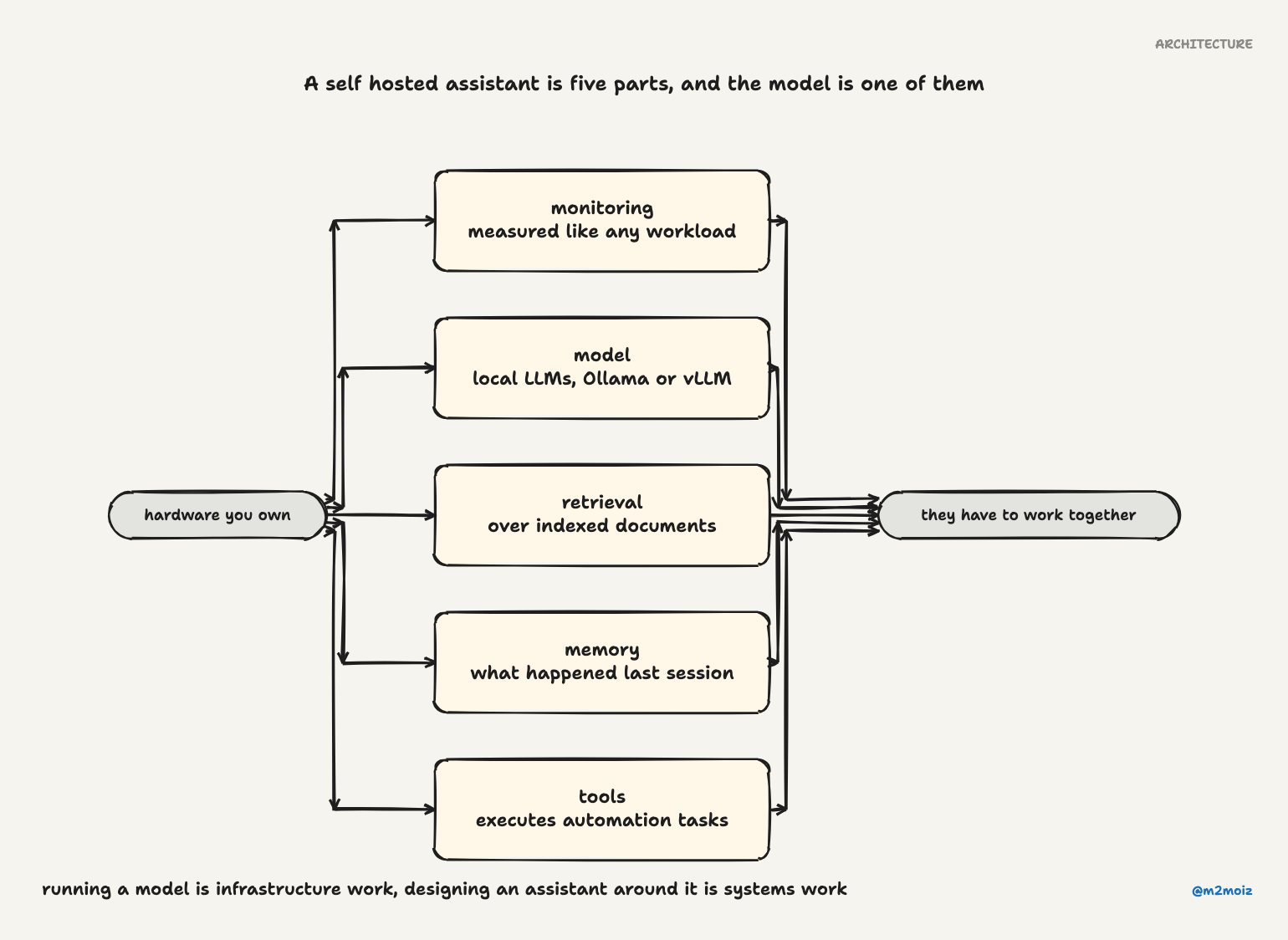
None of these are revolutionary. The point is they have to work together. That coordination is the hard part, and it is where most setups fall apart.
The things that made me stop and think
Four design decisions stood out. Each one exposed something I had been ignoring in my own setup.
1. Picking models like you have options
Most of us pick one model and stick with it. Its easy. Its also kind of dumb, because not all questions need the same horsepower.
A proper system lets you choose models intentionally. That led me to questions I had never asked myself:
- Should simple requests use a smaller, faster model?
- When does a question justify the cost of a bigger context window?
- What is the actual token-cost difference between my options?
Pretty obvious in hindsight. I just had never bothered to ask. Having a system that shows you these trade-offs changes how you think about inference. The question shifts from "which model should I use" to "what should each part of this interaction cost."
2. Retrieval is harder than it looks
Document retrieval sounds simple. Embed the documents, search by similarity, done. But the system I studied treats retrieval as an evolving component with real engineering trade-offs:
- Chunk size affects both recall and cost. Too small and you miss connections. Too big and you drown in noise.
- Hybrid search (keyword + vector together) often beats pure vector search.
- Reranking improves results but costs latency.
- Your indexing strategy directly impacts memory usage.
What I liked about this approach is that it bakes retrieval into a living assistant, not a demo notebook. There is a long way from "I can make a RAG pipeline work on my laptop" to "I can trust my assistant to find the right document every time." That path is paved with edge cases you haven't hit yet.
3. Memory stops being a feature and becomes a storage problem
Stateless LLMs are convenient until they arent. The moment you want the assistant to remember something from yesterday, you are now in the memory business. There is no going back.
A real memory system forces hard questions:
- What do you keep long-term versus short-term?
- When do you summarize context instead of storing it raw?
- How do you stop the context window from exploding?
- How do you index memory efficiently so retrieval actually works?
Memory stops being a checkbox feature and turns into a storage architecture problem with real consequences. Get it wrong and your assistant either forgets too much (useless) or remembers too much (slow and expensive).
4. Observability isnt optional
This one hit close to home. My local setup was a black box. It generated text. That was all I knew about it.
A well-instrumented system tracks:
- Token usage per request
- Latency by component
- Hardware utilization
- Throughput patterns
If AI runs on your hardware, it should be measurable like any other workload. You cannot improve what you cannot see. This is basic ops discipline, and somehow it evaporates the moment a model enters the picture.
What it actually feels like to use
From the outside, it looks like a chat interface. You type something. It responds. Nothing new.
Here is what actually happens when you ask it to summarize a technical report sitting on your local machine:
- It retrieves relevant document chunks from your indexed documents
- It selects an appropriate model for the task
- It generates the response
- It records token usage and latency
- It updates persistent memory if needed
The visible interaction is the same. The invisible behavior is completely different. That gap between what you see and what happens behind the scenes is the difference between a demo and something you actually rely on.
Plugins vs skills: a useful distinction
One thing worth stealing from this system: the separation between plugins and skills.
- Plugins extend the runtime itself. They add memory backends, model providers, communication channels, web tools, voice interfaces, and observability hooks. Your plugin choices determine how the assistant stores context, routes requests, and talks to the outside world.
- Skills extend what the assistant knows how to do. They are lighter, usually just a folder of instructions that teach the assistant when and how to perform a task and which tools to use, all wrapped up as a repeatable workflow.
Plugins change infrastructure. Skills change behavior. You can reconfigure what the assistant does without changing how the assistant works, and vice versa. That kind of clean separation only emerges once you have built something messy enough to need it.
What this means for my own setup
The biggest takeaway was a shift in perspective, more than any specific feature.
I had been treating local AI as "download a model, run a prompt." A more thoughtful approach treats it as a system with distinct layers (inference, memory, retrieval, routing, tools, observability), each needing its own design decisions.
The comparison that stuck with me: running a model is having an engine. Designing an assistant is building a vehicle. The engine matters, but so does the steering, the fuel gauge, the suspension, and the dashboard that tells you something is wrong before you hear the grinding noise.
For simple tinkering, an engine is enough. You can learn a lot from an engine on a workbench. But if you want something that actually takes you places, you need the rest of the vehicle too.
I am not there yet. But at least now I have a better sense of what I am building toward.
I looked at a specific open-source system called OpenClaw while researching this piece, but the patterns I am describing apply broadly to any self-hosted AI assistant worth setting up. The project is worth a look if you want concrete examples of these ideas in working code.