I have a problem. When I find a new category of technology, I need to try every single option myself. Not read a comparison and pick one. Not ask friends what they use. Every. Single. One.
When LLMs went local in a real way, this compulsion kicked into overdrive. Fast forward through months of my life and I have run language models on consumer GPUs, on servers in my closet, on cloud instances I forgot to turn off (hello, surprise bill), in Docker containers, in bare metal C++ runtimes, through proxy switchers, and probably inside some tool I have already forgotten about.
This is what I found.
The three camps
After all that, I think about LLM hosting in three buckets:
Local means running a model on the machine in front of you. Your laptop, your desktop, the gaming PC you told yourself was for "deep learning research." It is the easiest way to start and the hardest way to scale.
Self-hosted means running models on infrastructure you control but that lives somewhere else. A server in your house. A rented GPU box in a data center. The machine under your desk at work that IT does not know about yet.
Cloud means someone else owns the GPUs and you pay them per token. The easiest way to scale and the most expensive way to experiment.
Each bucket solves a different problem. Each one will also make you angry in a different way.
Ollama: The easy button (with limits)
Ollama is the reason local LLMs are mainstream. You install it, you type ollama run llama3.2, and you are chatting with a model on your laptop. Most people start here and never leave.
I keep Ollama around for prototyping, internal tools, and quick experiments. When I need to test whether an approach works before committing to infrastructure, this is what I reach for. It is also what I show people who want to see what all the fuss is about without configuring a server.
But Ollama has a ceiling. The concurrency model is fine for one or two users. For a team of ten hammering it at the same time? Things get slow. You also do not get fine-grained control over memory allocation, context handling, or scheduling. You trade control for convenience.
If you run it in Docker with NVIDIA GPUs and persistent model storage, you get a reproducible single-node endpoint that works well for a homelab or internal deployment. Put Caddy or Nginx in front for HTTPS and streaming and you have something surprisingly solid. But it is still a single node.
Just do not call it production ready if you have more than a handful of concurrent users. I learned that the hard way.
llama.cpp: For when you want to touch the machine
llama.cpp is the opposite of Ollama in every way that matters. It is a C/C++ inference engine with no Python dependency and no Docker requirement. Nobody is going to hold your hand. You build it, you point it at a GGUF model file, and you get a CLI or a server.
I love llama.cpp for the same reason I love cooking with a cast iron skillet. It forces you to understand what is actually happening. When I set --threads, --ctx-size, and --no-kv-offload, I am making deliberate choices about how memory and compute get used. No abstraction layer hiding the details.
The llama-server mode exposes an OpenAI compatible API. The newer router mode lets you switch models dynamically without restarting, which was my biggest pain point with earlier versions.
Where llama.cpp pulls ahead is edge deployment. I have run it on machines that have no Python at all. Machines where apt install takes an act of congress. Machines that people forgot existed in server closets. It compiles, it runs, it works.
The tradeoff is that you handle everything yourself. Configuration, model management, monitoring, restarting when it crashes at 2 AM. If that sounds like a good time, llama.cpp is for you. If it sounds like a nightmare, stick with Ollama.
The production runners: vLLM, TGI, and SGLang
When I outgrew Ollama and did not want to manage llama.cpp by hand, I moved to the bigger tools. These are built for throughput.
vLLM keeps showing up in my actual production workloads. It uses PagedAttention to manage the KV cache efficiently, which means you get more concurrent requests on the same hardware than with the simpler runtimes. Continuous batching, tensor parallel sharding, OpenAI compatible API out of the box. If throughput is what you care about, this is where you land.
TGI is Hugging Face's serving stack. Continuous batching, token streaming, Prometheus metrics, the same OpenAI compatible Messages API. The observability story is better than the alternatives. If you are already in the Hugging Face ecosystem, TGI fits naturally. The tradeoff is upstream development has slowed. The existing feature set is stable, but you are not getting cutting edge improvements anymore.
SGLang is the newer option. Strong throughput, structured output support, a native /generate endpoint alongside the usual OpenAI compatibility. The attention optimizations are solid and the YAML based server configuration beats command line flag salad.
My picks: vLLM for throughput, TGI if you are in the Hugging Face orbit, SGLang if you want to try something newer.
llama-swap: The glue nobody asked for
Here is the scenario that drove me crazy for weeks. I had one IDE plugin configured with a single OpenAI compatible endpoint. But I wanted to use different models for different tasks. Code completion needed a fast model. Chat needed a smart model. Embeddings needed a different endpoint entirely.
llama-swap solves this. It is a proxy, not an inference engine. It sits in front of multiple backends and routes requests to the right one. You configure a single /v1 URL for everything. The proxy decides which upstream model actually serves the request.
It supports hot swapping, TTL based unloading (so models that are not used get evicted from VRAM), and grouping so only the relevant upstream stays resident. If you run multiple models across different processes or containers, llama-swap makes the experience feel like one system.
I did not know I needed this until I had it. Now it is part of every self-hosted setup I build.
Docker Model Runner: If you already eat, sleep, and breathe containers
Docker Model Runner is exactly what it sounds like. Containerized model execution with explicit GPU allocation control. If your infrastructure runs on Docker and you do not want a separate toolchain for LLMs, this is the play.
It is simpler than vLLM but more structured than a raw llama.cpp container. The GPU passthrough works well, the context size is configurable, and it fits into existing Docker Compose setups without contortions.
I use it mostly in CI/CD pipelines and isolated deployment scenarios where reproducibility matters. If something works in Docker Model Runner on my machine, it works identically in production. That is worth something.
LocalAI: The multipurpose fallback
LocalAI tries to do everything. Text, embeddings, image generation, audio transcription, all through an OpenAI compatible API. It supports more model formats than anything else I have used: GGUF, GPTQ, AWQ, Safetensors, PyTorch. It even has a built in Web UI.
The ambition is impressive. The reality is that breadth comes with tradeoffs. Each modality has its own quirks and edge cases. Text inference is solid. Image generation works but needs more tuning than a dedicated tool. Audio is functional but uneven.
I reach for LocalAI when my project needs multiple modalities and I want one API surface for all of them. For pure text, I usually pick something more focused. But the flexibility is real, and for prototyping across modalities it is hard to beat.
Cloud: When you want to think about something else entirely
All of the above assumes you want to own the problem. Sometimes you do not. Sometimes you want an API key and a credit card and for the problem to be someone else's.
Cloud LLM providers abstract hardware entirely. No GPU investment, no infrastructure to manage, and the 2 AM server crashes are someone else's problem now. Scaling is instant and integration is fast.
I use cloud APIs for workloads where latency spikes do not matter and the volume is steady enough that the per token cost is predictable. I also use them as a benchmark for my self-hosted setups. If my local model is producing worse output than GPT 4o (or whatever the current best is by the time you read this), I want to know.
Recurring API costs add up shockingly fast when the model is handling real traffic. Vendor lock in is a thing. And you have zero control over what happens to your data on the provider's side. For some workloads that is fine. For others it is a non-starter.
The cost trap
Here is what I wish someone had told me before I started. The cost comparison between local and cloud is not straightforward.
Local requires a hardware purchase upfront. A decent consumer GPU costs real money. A dedicated server with multiple GPUs costs serious money. But once you have the hardware, the marginal cost per token is essentially zero. Electricity is basically free in the comparison.
Cloud has no upfront cost but recurring token billing that scales with usage. For light usage, cloud is cheaper. For heavy sustained usage, local wins. The crossover point depends on which hardware you buy and which cloud provider you compare against.
The original advice I got was "local is always cheaper." That is wrong. Local is cheaper at scale and more expensive at low volume. Run the numbers for your actual workload before committing.
Privacy and control
The single strongest argument for local hosting is not cost. It is data privacy.
When you run a model on your own hardware, your data stays on your hardware. No prompts travel to a cloud provider. No logs get analyzed for training data. No API terms of service change out from under you.
For personal projects this might not matter much. For enterprise workloads dealing with customer data, internal documents, or regulated information, it is often the deciding factor. I have had conversations that went "we want AI features" and then "we cannot send this data to an external API" in the same meeting. Local or self-hosted was the only option.
The tradeoff is that you own the operational burden. When a cloud provider's API goes down, it is their problem. When your local server goes down, it is your problem. Data sovereignty means operational sovereignty too.
What I actually use
After all the experimentation, my setup looks like this:
For quick experiments and prototyping, I use Ollama. It is fast to set up and fast to tear down. When an experiment becomes something I want to keep around, I migrate it.
For production serving at work, I use vLLM behind a load balancer with multiple GPU nodes. The throughput is predictable and the tooling around model management is mature enough for a team.
For my personal projects at home, I use llama.cpp on a single GPU machine with a reverse proxy in front. It is more work to maintain but I get exactly the control I want and no surprise bills.
For the rare project that needs images or audio alongside text, I use LocalAI.
And for everything that does not need to be on my hardware, I use a cloud API and try not to think about the total.
The decision framework
If you are trying to decide where to start, here is my honest advice.
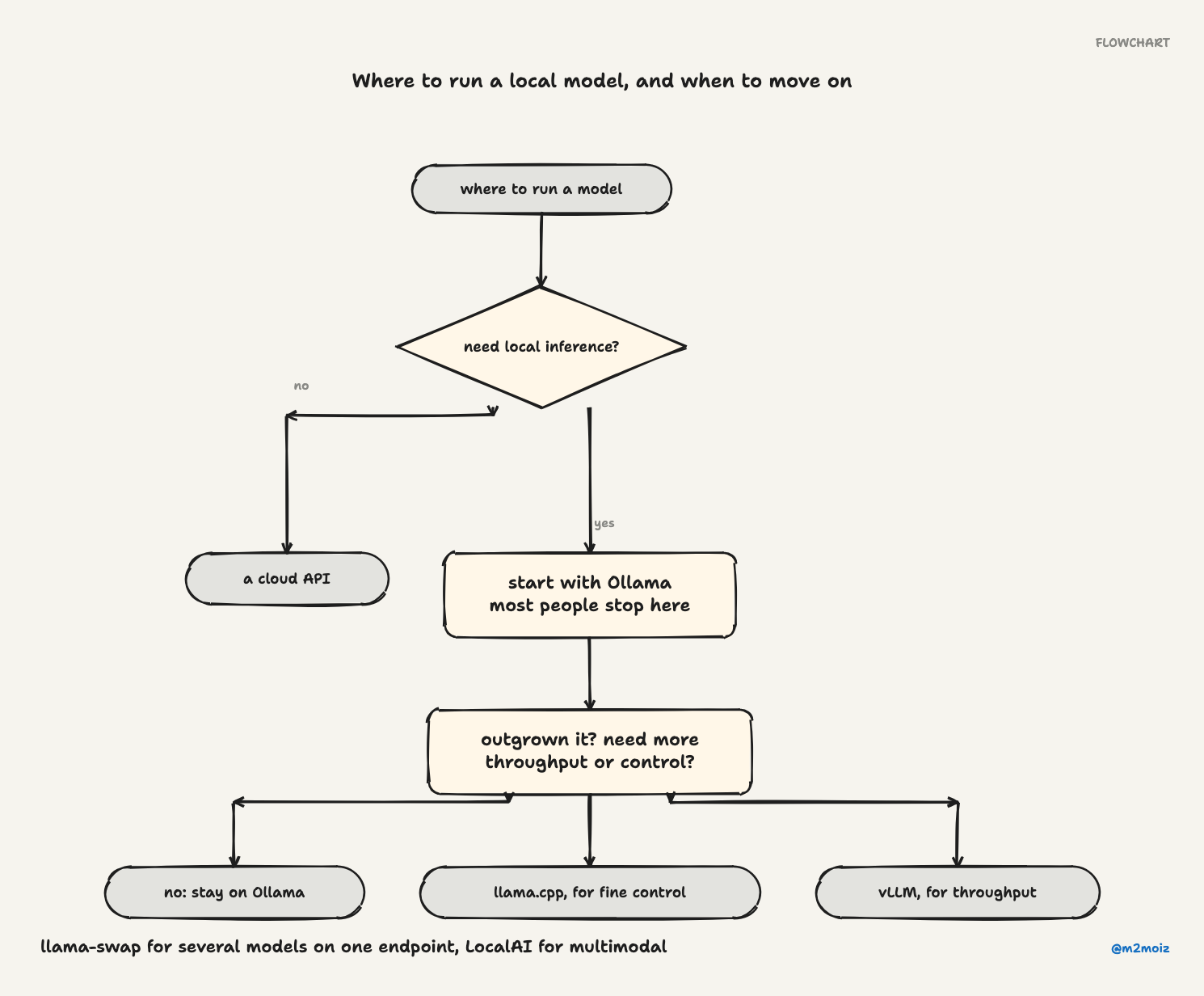
Start with Ollama. Download it, run a model, see if local inference does what you need. Most people can stop here.
If you outgrow Ollama and need more throughput or control, move to llama.cpp or vLLM depending on your tolerance for configuration. llama.cpp if you want fine control. vLLM if you want production throughput.
Need multiple models behind a single endpoint? Add llama-swap.
Already live in Docker? Try Docker Model Runner before introducing another tool.
Need multimodal support? Try LocalAI.
Never want to think about hardware again and have a budget for it? Use a cloud API.
The hybrid approach works too. Prototype locally, deploy critical workloads to cloud, keep control where cost and privacy demand it. That is what I do, and it is the only setup I have not regretted six months later.
Frequently asked questions
What is the best way to host LLMs locally?
For most developers, Ollama. It is the simplest entry point. For high throughput serving, vLLM.
Is self-hosting cheaper than using an API?
Depends on your usage. High and steady volume favors self-hosting. Low or spiky volume favors APIs. Run your actual numbers.
Can I host LLMs without a GPU?
Yes. You just will not enjoy it. A GPU makes a real difference.
Is Ollama production ready?
For small teams and internal tools, yes. For high throughput production workloads with many concurrent users, you will want a more specialized runtime and stronger operational tooling.
Which option gives me the most control?
llama.cpp. No abstractions, no hand holding. You configure every parameter yourself.