The day I realized my "AI assistant" was just a fancy autocomplete with delusions of grandeur.
When I sat down to design my own AI assistant, I had a vision. A beautiful vision. I'd throw an LLM behind a chat widget, write a killer system prompt, and watch it organize my inbox, manage my calendar, and file my taxes.
Six months later, I had a chat widget that could sometimes tell me the weather. But at least it was very confident about the wrong data.
Here's what I learned the hard way. A production AI assistant is a lot more than an LLM with a prompt. It's a whole system: distributed, stateful, and failure-prone in ways a prompt never warns you about. It accepts intent, holds context, and decides when to fetch data or run code. And it needs to expose enough runtime detail that you can figure out why it just booked a flight to Tokyo when you asked for the time in Tokyo.
I'll walk through the five layers I eventually settled on, the patterns that worked, and the failure modes that ambushed me.
The Naive Phase (or: How I Burned $400 on API Calls)
My first assistant had two components:
- A system prompt that said "you are a helpful assistant"
- Hopes and prayers
Every conversation was a fresh start, like talking to a cheerful stranger with amnesia. I'd tell it my name, my preferences, and that I hate pineapple on pizza. Next session: blank stare. "I'm sorry, what is a 'Moiz'?"
I tried cramming everything into the context window. User manual? Context window. Database schema? Context window. The entire history of my email correspondence? Context window. I learned about the Lost in the Middle paper the expensive way: models stop paying attention to stuff that isn't near the top or bottom of a massive context. Cramming doesn't count as architecture.
I needed roughly four more expensive lessons before I got serious.
The Five Components That Finally Made Things Work
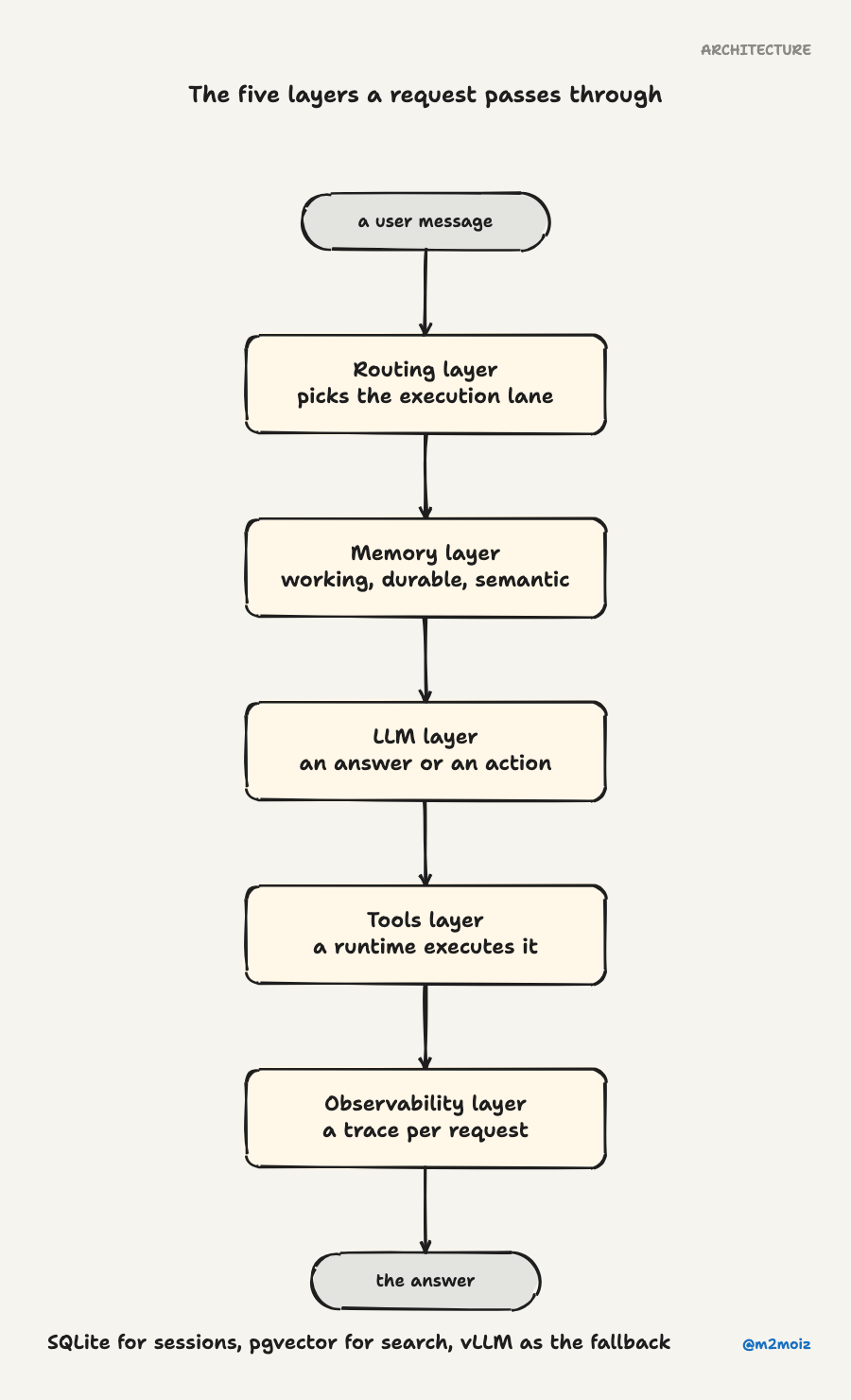
After enough failed experiments to fill a small museum of bad ideas, I landed on a split that actually holds up: LLM, Memory, Tools, Routing, and Observability. Each one does a specific job, and the interfaces between them matter more than any single component.
1. The LLM Layer (the brains, such as they are)
The LLM layer does exactly three things. It consumes the current working context. It emits either a final answer or a structured action request. And it returns enough metadata to support retries and tracing.
That's it. If your LLM layer is doing anything else (managing state, deciding which tool to call next, remembering who the user is), you've mixed concerns and future you will hate present you.
The major providers all follow the same playbook, give or take some naming. OpenAI calls it the Responses API with stateful interactions and function calling. Anthropic uses tool_use blocks and tool_result returns. The self-hosted crowd (vLLM, llama.cpp) emulate those provider interfaces so you can swap backends without rewriting everything.
The dirty secret I discovered: most of my "LLM issues" weren't LLM issues. They were context quality issues. A mediocre model with a clean, focused prompt beats a great model drowning in irrelevant junk every time.
2. The Memory Layer (bless this mess)
Memory is where I pulled the most teeth. I thought "memory = longer context window." Which makes about as much sense as "more gasoline = better car."
I eventually split memory into three buckets:
Working memory covers the current conversation. What we just talked about. It lives in the context window and goes poof when the session ends.
Durable memory is for things the assistant should remember across sessions. My name. My timezone. That I have a cat named Pixel. This needs actual storage with actual write semantics.
Semantic memory is searchable knowledge: documents, past conversations, reference material. It needs embeddings, a vector store, and decent retrieval to work.
The tricky part: "memory updated" and "memory visible to the current answer" are often different truths. One system might write to durable storage immediately but not make it visible until the next session. Another might snapshot memory at session start and freeze it there (great for performance, confusing for users who just updated something). A third option stages new memories in a review queue and only promotes the good ones.
I spent way too long chasing perfect read-after-write consistency before realizing it's a design choice, not a bug. You decide how fresh memory looks, and you document it so your users don't think the assistant is gaslighting them.
3. The Tools Layer (where the assistant touches reality)
This is where an assistant stops being a fancy autocomplete and starts being software. Tools are the contract boundary between the model and the world.
The pattern is universal. The model emits a structured request (JSON schema, function call, tool use block). Some runtime executes it. The result flows back into the conversation. The model never executes anything on its own. It's all request and response.
I broke this rule exactly once, and my assistant deleted a production database row. (It was a test database. I still haven't recovered emotionally.)
The lessons that cost me sleep:
Start with tight schemas, not loose ones. If a tool accepts "any string" for a filename parameter, the model will invent filenames. I once watched it try to read /etc/passwd because the prompt mentioned "user profiles."
Idempotency keys matter more than you think. Tool execution can fail halfway through, and the model might retry. If your tool doesn't handle retries safely, you get duplicate Stripe charges, duplicate emails, and duplicate regrets.
And approval gates. Some tools should require confirmation before running. I learned this when my "draft email" tool became my "send email" tool because the model decided to skip the draft step.
4. The Routing Layer (which model? which path? which budget?)
You'd think "pick a model" is the simplest decision in the stack. It's not. Because the real questions are about provider path: primary API, fallback, or self-hosted backup. Tenant and session identity. Budget class (premium users get GPT-4, free tier gets what's left). Latency targets. And the fallback when the primary is rate-limited or down.
A good router handles all of these. Think of it less as a load balancer and more as an execution lane picker.
I started with LiteLLM for routing, and it's refreshingly concrete about its patterns: weighted pick, least-busy, latency-based, cost-based, bounded failovers. They're all documented as first-class features rather than architecture astronautics.
The routing mistake I made most often: routing by cost without quality controls. I'd set a rule like "use the cheap model for summarization tasks," and the cheap model would confidently summarize financial documents into complete fabrications. Cheap tokens are cheap for a reason.
5. The Observability Layer (where your delusions die)
Here's the hard truth I resisted the longest: if your assistant has no trace per request, no span per model call, and no event history for tool execution, you do not have an architecture. You have vibes.
Observability is what prevents architecture from turning into folklore. When a user reports "the assistant gave me a wrong answer," you need to answer on the spot: what context was visible, which tool executed, which model answered, what memory was read or written, and where the time went. Five questions, one answer chain.
OpenTelemetry gives you the trace abstraction. LangSmith adds LLM-specific visibility with end-to-end tracking. And OpenLIT wraps it all in OpenTelemetry-native AI observability that covers LLMs, agent frameworks, vector databases, and GPUs.
I added tracing late in the process, and it immediately revealed that 60% of my "model inference" time was actually retrieval time. I'd been optimizing the wrong thing for months.
The Actual Flow (Not the One I Drew on a Napkin)
The sequence that actually works in production is: Capture, Enrich, Respond, Record. Different frameworks name it differently, but the shape is stable enough to treat as gospel.
sequenceDiagram
  participant U as User
  participant G as Gateway
  participant R as Router
  participant M as Memory
  participant L as LLM
  participant T as Tools
  participant O as Observability

  U->>G: message, command, or existential cry for help
  G->>O: start trace
  G->>R: request + identity + session
  R->>M: load session state, retrieve context
  M-->>R: notes, chunks, metadata
  R->>L: assembled prompt + tool schemas
  L-->>R: answer or tool call

  alt tool call
    R->>T: execute
    T-->>R: result
    R->>L: result + updated context
    L-->>R: final answer
  end

  R->>M: persist changes
  R->>O: spans, metrics, events
  G-->>U: response
Capture is more important than it looks. A good gateway handles channel metadata, identities, authorization, session boundaries. It also handles direct messages, group conversations, cron triggers, and delivery semantics. There's a lot. Skip this and you'll bolt it on as middleware later anyway. I speak from experience: I skipped it, and my "handy middleware" grew into a tangled monstrosity I'm still untangling.
Enrich is where mature systems separate from toys. Retrieval is the obvious one, but enrichment also means compression (don't pay premium model prices for summarization chores), context pruning (drop irrelevant chunks), and cross-referencing (check facts against source documents before answering).
Respond means closing the loop, not just generating text. The model either answers or asks for a tool. Your response object is both prose and execution plan.
Record is where dreams of consistency meet reality. Writes are rarely immediately visible across every layer. Some stores separate write and read paths. Different systems handle the gap differently: some freeze memory at session start, others promote durable memories through staged review queues. Design for staged visibility rather than pretending everything is instantly consistent.
The Pattern Zoo (or: Pick Your Poison)
I've watched enough assistants fail to name a few repeatable patterns:
| Pattern | What it optimizes for | Best use case | Hidden trap | |---------|----------------------|---------------|-------------| | Managed assistant | Speed of delivery | Internal tools, support bots | Provider lock-in | | Retrieval-first assistant | Grounded answers | Docs, knowledge work | Retrieval quality is now your product | | Tool-first assistant | Action over conversation | Ops workflows, automation | Side effects, retries, approvals | | Gateway assistant | Ubiquitous access | Personal/team assistants | Identity and session complexity | | Specialist mesh | Division of labor | Complex multi-domain workflows | Debugging is now multiplayer |
The mistake I made most: jumping straight to "specialist mesh" because it sounded cool. Multi-agent is powerful, but only after you can explain your single-agent failure cases without guessing. Start boring. Pick one orchestrator, one durable memory path, one trace per request. Graduate to the fancy stuff when the boring stuff is humming.
Where Things Actually Break (a personal hit list)
Here's the table I wish someone had given me when I started. Most assistants don't fail because the model is bad. They fail because the system around the model lies to it, starves it of context, lets tools drift, or makes debugging impossible.
| Where it breaks | What you'll see | Why it happened | What to do about it | |-----------------|-----------------|-----------------|---------------------| | Prompt assembly | Confident but wrong | Too much noise, too little signal | Curate context, rerank, keep key facts at the top | | Retrieval | Correct tone, wrong facts | Bad chunking, stale index | Evaluate retrieval separately, add filters | | Tool boundary | Wrong action or double action | Loose schemas, no idempotency | Tighten schemas, add idempotency keys | | Routing | Inconsistent behavior | Cost routing without quality checks | Sticky sessions, per-route evals | | Memory | Stale or poisoned recall | Over-eager writes, no review | Separate working from durable, review promotions | | Observability | No idea what happened | Missing traces | Trace everything from day one | | Hallucination control | Plausible fictions | Weak grounding | Reference-doc validation, consistency checks |
The boring mitigations are the ones that work: trace every request, version your prompts, evaluate retrieval independently, keep tools idempotent, and run regression evals before changing routes or memory policy.
The Boring Stack That Actually Works
After all the experiments, the architecture I run today is almost boring. And I mean that as the highest compliment.
A gateway sits in front. A router picks the execution lane based on session policy and latency targets. The primary LLM is a provider API; the fallback is a self-hosted model running on vLLM. For memory: SQLite manages session state, pgvector powers semantic search, and durable notes live in a plain file store. Tools follow strict JSON schemas with idempotency keys. Every single request gets a full OpenTelemetry trace.
It's not fancy. It doesn't use multi-agent orchestrators or dynamic prompt graphs or whatever the cool kids are doing this week. But I can explain every failure mode without guessing, and that's the only architecture metric that actually matters.
If you're building your own assistant, start boring. Pick one orchestrator, one durable memory path, one trace per request, and one explicit policy for tool execution. The complexity will find you soon enough without you going looking for it.